Wednesday, 14 March 2012

8 Microsoft Word Shortcuts You Probably Don’t Know

Microsoft Word: Love it or hate it, practically everyone uses it. I've been using it so long, I thought I knew everything about it. But I stumbled across some super helpful shortcuts — hidden tricks and timesavers that make Microsoft Word easier and faster.
One caveat for these tips: different versions of Word may have different commands, so some of these may not work in your version. That said, here are my top eight shortcuts:
1. Double Click And Drag
If you're like most people, when you want to move a section of text from one place to another, you use Control-C to cut and Control-V to paste. That's fine. It works. But there's a faster way: Double click or highlight what you want to move, then simply drag what you've highlighted to where you want it to land.
2. Double Underline
You know you can affect text by hitting Control-B to make it bold or Control-U to underline. But if one line of underlining just isn't emphatic enough, Control-Shift-D will double underline. (On a Mac, use Command-Shift-D.)
If that doesn't make your point, you may have to go to ALL CAPS, and I've got a shortcut for that too…
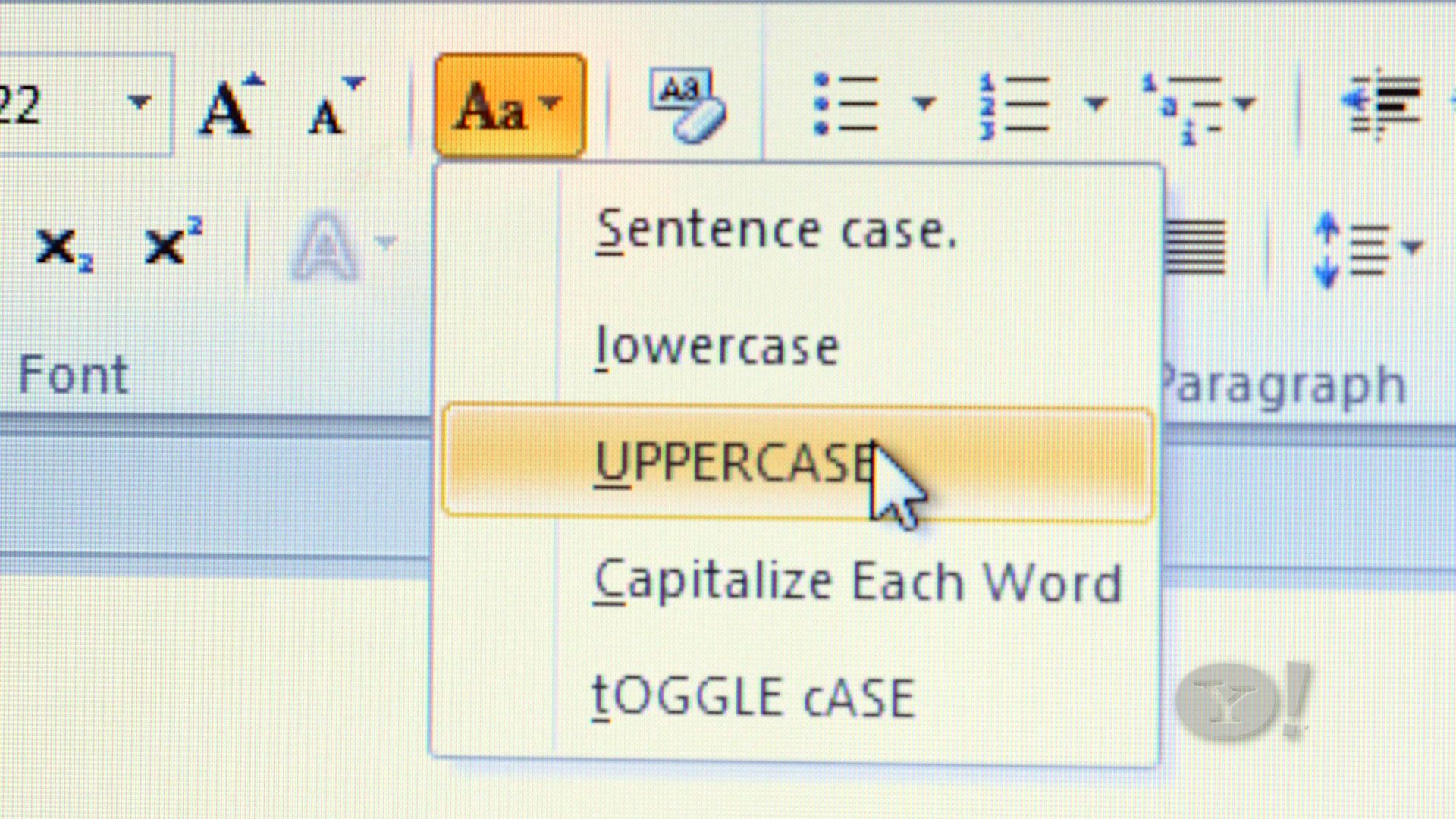
3. Change CaseChange Case button
Instead of retyping everything to change from lower case to Title Case or to UPPERCASE, just highlight the text you want to change, click the case button, and then choose which case you want.
4. Adding Buttons to Your Toolbar
Suppose you just tried using shortcut #3, but the case button isn't on your toolbar, no worries; you can add it (and almost any other command). Go to View, Toolbars, Customize Toolbars, Commands, then scroll to find the command you want — and drag it to where on the toolbar you want it.
5. Add the Date
How many times a day do you type the date? If you do it even once, that's too much. Next time, just hit Alt-Shift-D (or Control-Shift -D on a Mac) to add the date automatically.
6. Quick Parts
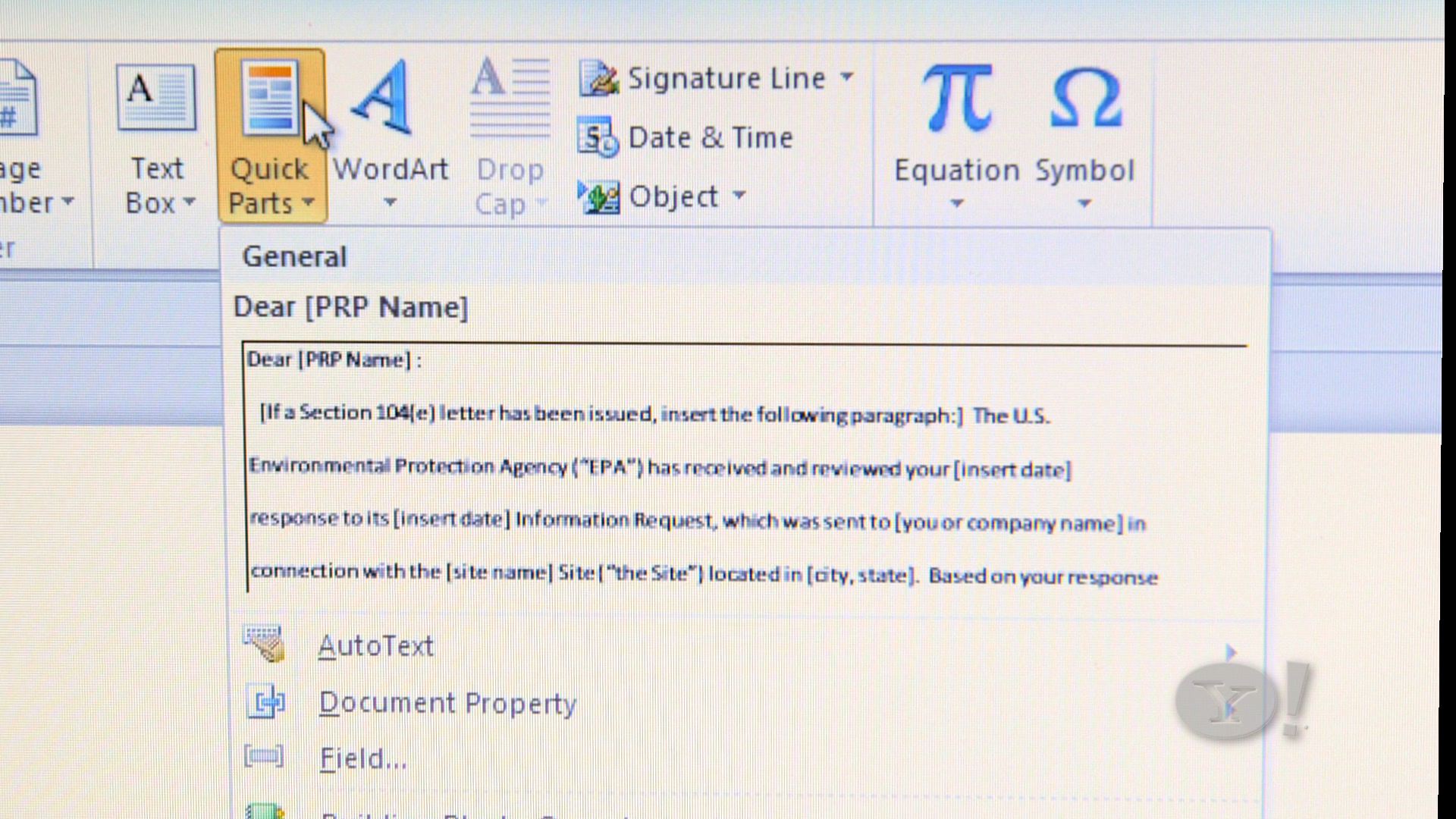
This next tip builds on what the Autotext function did in older versions of Word: If you have a certain paragraph of text you regularly need to add to a document — like a boilerplate disclaimer, or maybe directions to your office — turn it into a Quick Part. Here's how:Quick Parts
  1. Highlight the text you regularly use
  2. Click the insert tab
  3. Hit Quick Parts, and choose "Save Selection To The Quick Part Gallery"
Now any time you want to insert that chunk of text into a document, either a new one or and old one you're editing, just hit that Quick Parts button. Just one more click will select which saved Quick Part to insert. This trick will even work as a shortcut for adding a logo or letterhead.
7. Conform Fonts
This one used to drive me crazy: I'd copy and paste some bit of text from another document or from the Web, and then I'd have to click all over the place to get the font size and style to match the surrounding text of my existing document. No longer. Here's all you need to do: Highlight the non-conforming text, then hit Control-Spacebar. Done.
8. Customize Quick Access Toolbar
There is one way to get your most commonly used commands in the same place- that's to customize the Quick Access Toolbar.  It's like the center drawer in your desk that has all the stuff you use most in one easy-to-access place. No organization, just (as the name implies) quick access. So take the things you like most and add them to the Quick Access toolbar. Click the little down arrow tab to get to the Customize Quick Access Toolbar drop down menu:uyl_ep54_quick_access2 crop
Hit "more commands" and add whatever you use most. You can also position this toolbar below the ribbon if you prefer it to be closer to your document text.
Related Content:

Thursday, 8 March 2012

Promise DVRs Record Every Channel. Save a Week’s Worth of Shows

The Promise Pro (top left) and Promise Lite (bottom right) DVRs. [Photos: Promise.tv]I love everything about my DirectTV DVR; it lets me rewind, skip commercials, and save any show I want. The only thing it can’t do is record more than two programs at the same time.
Even a TiVo Premier XL can record only four programs simultaneously, but a Promise.tv DVR can record every broadcast channel and saves it for days and days. It doesn’t even need to be set with a particular time period or even a certain channel; it just records everything.
These Promise recorders are only available in the United Kingdom because they only work the nearly 60 Freeview channels--essentially the equivalent of our free, local broadcast channels--that only exist across the pond. After the Promise DVR has recorded everything, you can just go through the list and pick the shows you actually want to watch.
Of course, this requires a lot of storage, which means the price is steep. The cheapest box, Promise Lite ($1900), can only save up to three days of content from “major” Freeview channels like the BBC. Meanwhile on the highest-end, the Promise Pro ($4000) can record everything from the all the Freeview channels for a whole week.
Promise just launched in the London area and it will be rolling out to the rest of the UK. Right now there aren’t any plans to bring it stateside, but we can always hope and pray.
Do want? Leave a comment.

Smartest HDTVs of CES 2012


Giant TV: LG 4K 3D TV 

Name/Model No.: 84LM9600
Display Size: 84 inches
Features: 3D, Smart TV apps, Magic Remote with voice and motion control, 3840-by-2160 resolution
LG's smart TV offering this year is its 84-inch 4K 3D television. The giant television not only features a resolution four times that of 1080p, it is also sporting LG's new Magic Remote that features voice and motion control. No word on pricing yet, but some reports are saying the 4K monster will ship later this year. The problem is there's not a whole lot of video out there shot at 4K resolution-- an emerging standard for resolution in digital film and computer graphics--so how often you'll be able to be dazzled by 4K in 2012 remains to be seen.

The Future of Mobile Phones Use Any Phone on Any Wireless Network

The reason most cell phones are so cheap is that wireless carriers subsidize them so you'll sign a long-term contract. Open access could change the economics of the mobile phone (and mobile data) business dramatically as the walls preventing certain devices from working on certain networks come down. We could also see a rapid proliferation of cell phone models, with smaller companies becoming better able to make headway into formerly closed phone markets.
What is it? Two years is an eternity in the cellular world. The original iPhone was announced, introduced, and discontinued in less than that time, yet carriers routinely ask you to sign up for two-year contracts if you want access to their discounted phones. (It could be worse--in other countries, three years is normal.) Verizon launched the first volley late last year when it promised that "any device, any application" would soon be allowed on its famously closed network. Meanwhile, AT&T and T-Mobile like to note that their GSM networks have long been "open."
When is it coming? Open access is partially here: You can use almost any unlocked GSM handset on AT&T or T-Mobile today, and Verizon Wireless began certifying third-party devices for its network in July (though to date the company has approved only two products). But the future isn't quite so rosy, as Verizon is dragging its feet a bit on the legal requirement that it keep its newly acquired 700-MHz network open to other devices, a mandate that the FCC agreed to after substantial lobbying by Google. Some experts have argued that the FCC provisions aren't wholly enforceable. However, we won't really know how "open" is defined until the new network begins rolling out, a debut slated for 2010.
Your Fingers Do Even More Walking
Last year Microsoft introduced Surface, a table with a built-in monitor and touch screen; many industry watchers have seen it as a bellwether for touch-sensitive computing embedded into every device imaginable. Surface is a neat trick, but the reality of touch devices may be driven by something entirely different and more accessible: the Apple iPhone.
What is it? With the iPhone, "multitouch" technology (which lets you use more than one finger to perform specific actions) reinvented what we knew about the humble touchpad. Tracing a single finger on most touchpads looks positively simian next to some of the tricks you can do with two or more digits. Since the iPhone's launch, multitouch has found its way into numerous mainstream devices, including the Asus Eee PC 900 and a Dell Latitude tablet PC. Now all eyes are turned back to Apple, to see how it will further adapt multitouch (which it has already brought to its laptops' touchpads). Patents that Apple has filed for a multitouch tablet PC have many people expecting the company to dive into this neglected market, finally bringing tablets into the mainstream and possibly sparking explosive growth in the category.
When is it coming? It's not a question of when Multitouch will arrive, but how quickly the trend will grow. Fewer than 200,000 touch-screen devices were shipped in 2006. iSuppli analysts have estimated that a whopping 833 million will be sold in 2013. The real guessing game is figuring out when the old "single-touch" pads become obsolete, possibly taking physical keyboards along with them in many devices.
Cell Phones Are the New Paper
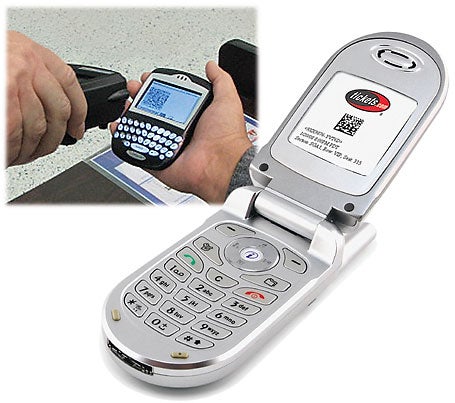
Click here to view full-size image.Photograph: Courtesy of TSA (left); courtesy of Tickets.com (right)Log in to your airline's Web site. Check in. Print out your boarding pass. Hope you don't lose it. Hand the crumpled pass to a TSA security agent and pray you don't get pulled aside for a pat-down search. When you're ready to fly home, wait in line at the airport because you lacked access to a printer in your hotel room. Can't we come up with a better way?
What is it? The idea of the paperless office has been with us since Bill Gates was in short pants, but no matter how sophisticated your OS or your use of digital files in lieu of printouts might be, they're of no help once you leave your desk. People need printouts of maps, receipts, and instructions when a computer just isn't convenient. PDAs failed to fill that need, so coming to the rescue are their replacements: cell phones.
Applications to eliminate the need for a printout in nearly any situation are flooding the market. Cellfire offers mobile coupons you can pull up on your phone and show to a clerk; Tickets.com now makes digital concert passes available via cell phone through its Tickets@Phone service. The final frontier, though, remains the airline boarding pass, which has resisted this next paperless step since the advent of Web-based check-in.
When is it coming? Some cell-phone apps that replace paper are here now (just look at the ones for the iPhone), and even paperless boarding passes are creeping forward. Continental has been experimenting with a cell-phone check-in system that lets you show an encrypted, 2D bar code on your phone to a TSA agent in lieu of a paper boarding pass. The agent scans the bar code with an ordinary scanner, and you're on your way. Introduced at the Houston Intercontinental Airport, the pilot project became permanent earlier this year, and Continental rolled it out in three other airports in 2008. The company promises more airports to come. (Quantas will be doing something similar early next year.)
Where You At? Ask Your Phone, Not Your Friend
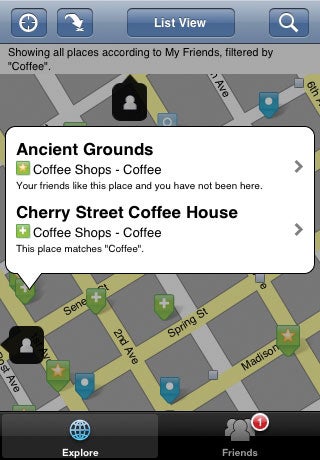
Click here to view full-size image.GPS is taking off, as phone makers, carriers, and service providers have realized that consumers generally have no idea where they are, ever. A location-based service (LBS) takes raw GPS data that pinpoints your location and enhances this information with additional services, from suggesting nearby restaurants to specifying the whereabouts of your friends.
What is it? LBS was originally envisioned as simply using old-school cell-phone signal triangulation to locate users' whereabouts, but as the chips become more common and more sophisticated, GPS is proving to be not only handy and accurate but also the basis for new services. Many startups have formed around location-based services. Want a date? Never mind who's compatible; who's nearby? MeetMoi can find them. Need to get a dozen people all in one place? Both Whrrl anduLocate's Buddy Beacon tell you where your friends are in real time.
Of course, not everyone is thrilled about LBS: Worries about surreptitious tracking or stalking are commonplace, as is the possibility of a flood of spam messages being delivered to your phone.
When is it coming? LBS is growing fast. The only thing holding it back is the slow uptake of GPS-enabled phones (and carriers' steep fees to activate the function). But with iPhones selling like Ben & Jerry's in July, that's not much of a hurdle to overcome. Expect to see massive adoption of these technologies in 2009 and 2010.

Memristor circuits lead to ultrasmall PCs


Click here to view full-size image.Photograph: Courtesy of HP


Since the dawn of electronics, we've had only three types of circuit components--resistors, inductors, and capacitors. But in 1971, UC Berkeley researcher Leon Chua theorized the possibility of a fourth type of component, one that would be able to measure the flow of electric current: the memristor. Now, just 37 years later, Hewlett-Packard has built one.
What is it? As its name implies, the memristor can "remember" how much current has passed through it. And by alternating the amount of current that passes through it, a memristor can also become a one-element circuit component with unique properties. Most notably, it can save its electronic state even when the current is turned off, making it a great candidate to replace today's flash memory.
Memristors will theoretically be cheaper and far faster than flash memory, and allow far greater memory densities. They could also replace RAM chips as we know them, so that, after you turn off your computer, it will remember exactly what it was doing when you turn it back on, and return to work instantly. This lowering of cost and consolidating of components may lead to affordable, solid-state computers that fit in your pocket and run many times faster than today's PCs.
Someday the memristor could spawn a whole new type of computer, thanks to its ability to remember a range of electrical states rather than the simplistic "on" and "off" states that today's digital processors recognize. By working with a dynamic range of data states in an analog mode, memristor-based computers could be capable of far more complex tasks than just shuttling ones and zeroes around.
When is it coming? Researchers say that no real barrier prevents implementing the memristor in circuitry immediately. But it's up to the business side to push products through to commercial reality. Memristors made to replace flash memory (at a lower cost and lower power consumption) will likely appear first; HP's goal is to offer them by 2012. Beyond that, memristors will likely replace both DRAM and hard disks in the 2014-to-2016 time frame. As for memristor-based analog computers, that step may take 20-plus years.
32-Core CPUs From Intel and AMD
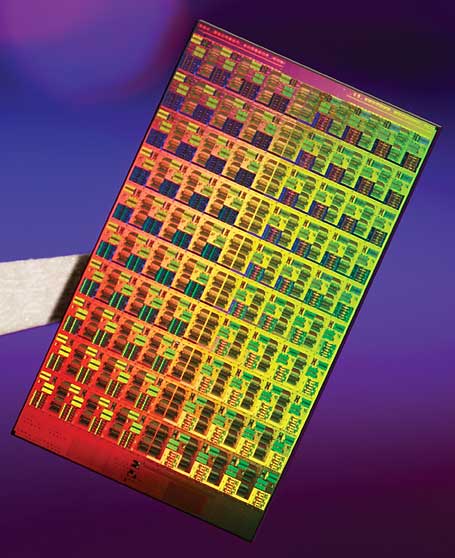
Click here to view full-size image.Photograph: Courtesy of IntelIf your CPU has only a single core, it's officially a dinosaur. In fact,quad-core computing is now commonplace; you can even get laptop computers with four cores today. But we're really just at the beginning of the core wars: Leadership in the CPU market will soon be decided by who has the most cores, not who has the fastest clock speed.
What is it? With the gigahertz race largely abandoned, both AMD and Intel are trying to pack more cores onto a die in order to continue to improve processing power and aid with multitasking operations. Miniaturizing chips further will be key to fitting these cores and other components into a limited space. Intel will roll out 32-nanometer processors (down from today's 45nm chips) in 2009.
When is it coming? Intel has been very good about sticking to its road map. A six-core CPU based on the Itanium design should be out imminently, when Intel then shifts focus to a brand-new architecture called Nehalem, to be marketed as Core i7. Core i7 will feature up to eight cores, with eight-core systems available in 2009 or 2010. (And an eight-core AMD project called Montreal is reportedly on tap for 2009.)
After that, the timeline gets fuzzy. Intel reportedly canceled a 32-core project called Keifer, slated for 2010, possibly because of its complexity (the company won't confirm this, though). That many cores requires a new way of dealing with memory; apparently you can't have 32 brains pulling out of one central pool of RAM. But we still expect cores to proliferate when the kinks are ironed out: 16 cores by 2011 or 2012 is plausible (when transistors are predicted to drop again in size to 22nm), with 32 cores by 2013 or 2014 easily within reach. Intel says "hundreds" of cores may come even farther down the line.

Wednesday, 7 March 2012

FOUR TIMES faster, has 3D capability and a sharper picture than an HD TV

ipad
Apple CEO Tim Cook (pictured) introduces the latest version (top left) of the device at a special event in San Francisco. Though slightly heavier than its predecessor, Apple says the new display will be even sharper than the high-definition television set in the living room, and will also include more saturated colours and a more hi-res picture (seen at top right) than previous models.